Ipinapakita ang mga post na may etiketa na IT. Ipakita ang lahat ng mga post

Miyerkules, Marso 21, 2018

Share wifi connection Mars WiFi Free WiFi HotSpot

This application is free to use no need to pay any amount of money. Really works specially for windows 10. whereas another software failed to performs well.


Mars WiFi is a free Windows program that helps users share a WiFi connection with any other device. In essence, Mars acts as a hotspot that turns your computer into a wireless router. Don’t fear, though—Mars provides a secure network that prevents other devices from access so you’re personal information is never compromised. Users can also personalize and customize their settings, including changing device names, speed limits and black-listing specific devices and computers. For any issues with the service, Mars WiFi support will help you troubleshoot dropped wifi signals, failures and more. For free WiFi any time, Mars WiFi is the clear choice. Download it here.

PROS
  •     Turn your computer into a router
  •     Safe and secure

CONS

  •     Not available through official Windows app store
  •     Not available on Macs

Collect Free MB in Globe Switch for Free Internet

Internet is one of the best source of information and it cost a lot here in the Philippines but globe offer a free MB to collect using SWITCH. It is a gift for those who cannot afford specially students who have a little budget to use Internet.But it is not applicable for downloading used for research and facebook only.


What is Switch?

SWITCH is a Globe-exclusive store that brings you mobile internet access to the most popular apps at the most affordable prices available. Useful control features keep you informed of your mobile internet usage, preventing unwanted charges, so you have full control of your budget. With Globe Switch, you can feel confident to explore a world of amazing deals on mobile internet access like never before.

Storefront:
1. Enjoy permanently FREE access to a selected group of apps and games

2. Spend less on internet access you don’t need – we offer low prices for access to apps for 1 hour, 1 day and 1 week so you don’t have to pay for mobile internet that you don’t use

3. Discover great deals and discounts through our “Hot Deals” notifications – look out for our notifications on limited-time discounts of 50% on selected apps
4. Build the right mobile internet package for you – bundle mobile internet packages with voice and SMS to suit your needs

Data Control:
1. Manage your data usage through our control tab – give yourself full control of your data usage by switching off any apps from consuming data in our control tab

2. Never go over your internet budget again – we give you full visibility into where your usage goes so you never have to worry about over charges. In the usage tab, we analyze how much data and wifi your apps are consuming.

Download in Goggle Play

Martes, Marso 20, 2018

How to view Hidden Folder by Virus (Win32:Atraps-PZ[Trojan])

HFV (Hidden Folder Virus) Cleaner Pro
A Small Utility programmed to destroy Win32:Atraps-PZ[Trojan] 

Most of us uses pen drives and some may have this virus in their pendrives as well as in their hard drives. One sign that you are actually infected is the you can find a peculiar shortcut in your drive. It will be an .ink file and you will be forced to open the shortcut to see the contents of your pen drive. It’s a hectic task to remove the virus manually and it would be a difficult task for the beginners. The main problem of this particular virus is that it infects so often that we should repeat the task again and again.
So here are some precautions and solution for the problem.
Precautions :
  1. Defend your system: You should put on a popular Antivirus software to defend such viruses.And that’s not it, update it regularly too. Its the number one priority.
  2. Assign specialised software to do the stuff: Users should also be aware that viruses, worms, malware and all are generated daily and one single protection from an anti virus may not always be helpful. So install secondary defense mechanisms specialised to do such stuff like malwarebytes.
Solutions :
  1. The basic stuff : This involves a “command prompt”. Now click “start”, “run”, “type CMD” “type the drive letter of your flash drive or external hard disk and a colon after it “eg F:” Once done type this attribute “attrib f:*.* /d /s -h -r -s”. You should see your files now and Shortcut Virus must be removed.However, in some occasion using this method returns an access denied error. This problem is common on hard disk that uses NTFS this is rare on Flash drives (FAT & FAT32).
  2. Do the ‘MalwareBytes’ scan. This usually fixes.
  3. Shortcut virus remover – HFV Cleaner Pro :  HFV Hidden Folder Virus is my favorite shortcut virus remover. It is easy to use and you don’t need to install it in your system because it works as a standalone application. If run in the first time, it will prompt you to enter your desired password. HFV can disinfect and remove shortcut virus both from internal and portable devices. To clean your Hard Drive, Folder, Files or Portable device just simply click the “ADD” or “BROWSE”, select the desired drive, folder or file, then choose the “Delete Virus” after that click  “Unhide Files” to recover your files. That’s how easy HFV removes shortcut virus.

Lunes, Pebrero 19, 2018

Create Shortcut Link for Bluetooth File Transfer Win 10

Creating shortcut links on desktop are norm since the early days of GUI'd Windows. We put shortcut links of programs and files for easy access. We just create shortcut to desktop, and we can easily access the files or programs quickly. The desktop is what we see when the computer was logged in. Win 10 provided many nice features and improvements as compared to other Windows version like 7 or 8. However, some taken for granted shortcuts are suddenly missing. Many of the user-friendly settings where replaced by a mobile version Settings. One of the said settings is Bluetooth file transfer.

Bluetooth file transfer enable uses to send or receive file. What a typical Win 10 settings will only show On/ Off option for bluetooth. How would you use a bluetooth after you turned it on? No choices is given from the window. Basically, you end up not being able to receive or send because of this change. Win 7 offers easy to navigate bluetooth file transfer option by even just searching in "Search for programs and files" in the start menu. Now, searching on Win 10 will not bring the Bluetooth file transfer window as a result.

To create a shortcut link for Bluetooth file transfer in Win 10, download the link provided. The link contains a zip file, extract the content and save it on the desktop. The Bluetooth file transfer shortcut will open the Bluetooth file transfer window. Feel free to check the link property, as the link only points to the hidden Bluetooth file transfer executable of Windows.

Download the Bluetooth file transfer shortcut zip here.

Biyernes, Pebrero 16, 2018

Free Chess Titans Download

Chess Titans is a chess game with 3D graphics developed by Oberon Games and included in Windows Vista and Windows 7 Home Premium, Business/Professional, Enterprise, and Ultimate. It is a fully animated, photorealistic interactive game with ten difficulty levels. It can be played by two participants, or one player against the computer.


Huwebes, Enero 25, 2018

Oppo F5 Reviews

Specifications of OPPO F5 32GB (Gold)

What's in the box:
  • 1x Handset ,1x Charger, 1x User Manua, 1x Earphones
General Features:
SKU OP622ELAB4MQREANPH-89068442
Screen Size (inches) 6.0
Model F5
Storage Capacity 32GB
Warranty period 1 Year
Warranty type Local Manufacturer Warranty


The F5 touch screen is limitless in the purest form, unadulterated by borders or buttons. All 6.0" FHD+ display fit aesthetically within a narrow frame, making it easily portable. The vibrantly colorful screen featuring 2160x1080 pixels is visually immersive, whether you are flicking through your photo albums, watching videos or playing games.

The sleek unibody of the F5 is a sight to behold and a pleasure to touch. As with all things elegant, its simplicity belies the elaborate design process. Its unusual lightness of being adds a poetic touch to its overall feel.

The F5’s curved exterior adheres to a streamlined design philosophy. Honed from countless design calibrations to arrive at its signature graceful look and feel, it embodies elegance in its entirety. Regardless of which angle you are viewing it from, or how light it feels to your touch.

Ushering in the F5’s perfectionist streak is a 0.4mm hairline laser string carved using vacuum radium technology. Located at the tip of the device, this finespun linear finish is one intricate detail that sets it apart in the design stakes.

The OPPO F5 comes in sophisticated Black or Gold models, and also offers you a choice of a higher performance 6GB RAM version. The F5 6GB makes a stunning entrance in a fashionably vibrant red, with a higher 64GB ROM configuration for a smoother switching, gaming, storage and all-round operating experience.

Miyerkules, Disyembre 20, 2017

Create Your Own HPI and Ehi files For PC/Laptop and Android Phone


HPI and Ehi files are part of the HTTP Injector extension. HPI for desktop Computer/Laptop and EHI for Android Phone extension.HTTP Injector is a professional tool to set custom HTTP header. It's used to connect your SSH/Proxy with the custom header to help you access blocked websites behind firewall with SSH tunneling support & proxy server using build-in Android VPN. It will help you surf the internet privately and securely.

 Download your injector for PC/Laptop and chose your compatible version:


Download your injector for android:  
or


Before, http inhjector we will create first a vpn account at www.tcpvpn.com
Chose a server from ASIA, EUROPE, AMERICA, AFRICA


Create own account and passwords


Click Create Premium Account


The VPN account is now created and ready for making HPI and EHI Files.

For PC/laptop :

Open HTTP Injector Proxy Injector.Go to SSH tab in http injector
Input the field from created vpn account:

Host: from created account in tcpvpn - IP
port : 22 always
user:  tcpvpn.com-sampleUSALOs
password: sampleusalos

Copy paste the user name and password check the Auto Reco, check Bitvise and PF Portable.


Go to Tools click the Payload Generator
Input:
Host/Domain: www.google.com
method: connect
Injection: Back injection
check Dual connect
Check X-ONLINI-HOST
Check keep alive
and Click Generate


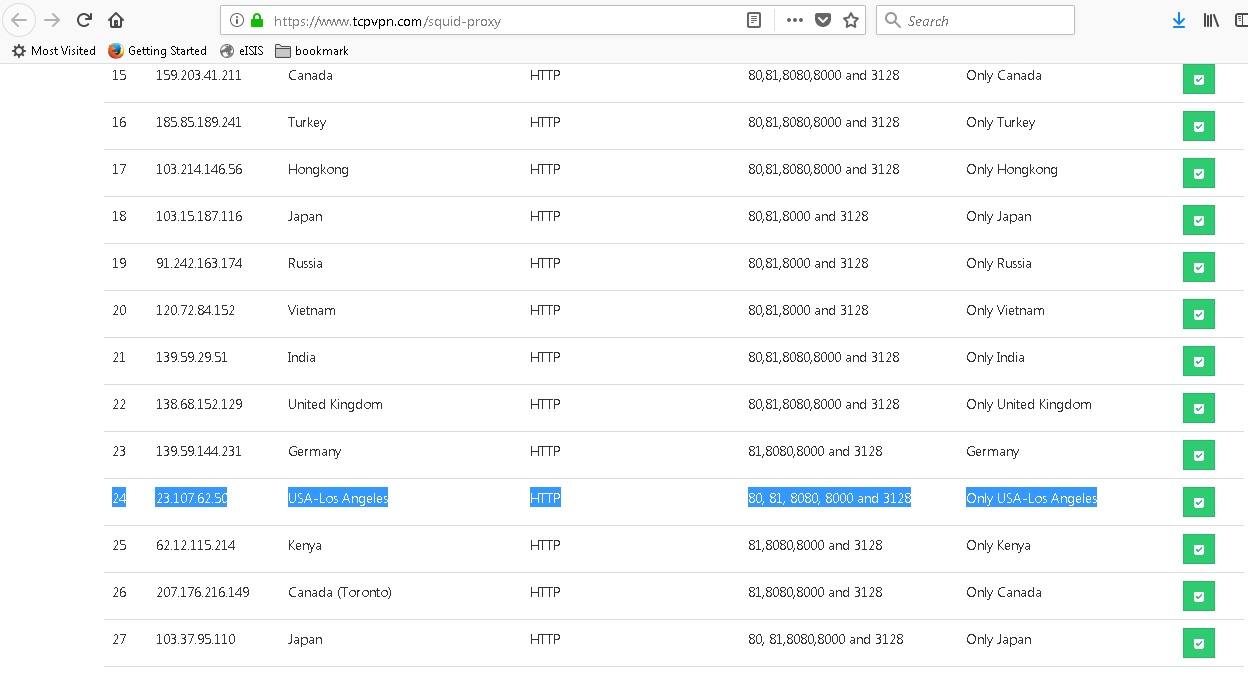
Last but not the least Proxy and port. Visit here for your proxy and port https://www.tcpvpn.com/squid-proxy. If you create USA Los Angeles server, you must find the same proxy and port from USA Los Angeles.


 Input IP and port to Proxy:Port

Finish! you can start or export as HPI file click on file tab go to export config click export make your own file name and your done.

Please watch this for EHI config


Biyernes, Hulyo 14, 2017

Asus Zenfone 3 Max 5.2 ZC520TL

Asus Zenfone 3 Max 5.2 ZC520TL

Asus Zenfone 3 Max 5.2 or ZC520TL is a 5.2" display, smartphone in the ZenFone 3 series.  Current discounted price is ₱ 7,253.07 that can be checked here. Previous introductory price is ₱ 8990.00 on its initial release.

Miyerkules, Hunyo 7, 2017

Email Servers: Microsoft Exchange Server 2013 Review

Email Servers: Microsoft Exchange Server 2013 Review

Organizations rely on email heavily to receive information, and send to recipients external or internal of the organization. Additional features are often added like calendar and address book. We will look at Microsoft's Exchange server as an Email server.
Microsoft Exchange Server is a mail server and calendaring server created by the company giant Microsoft Corporation. It runs only on Windows Server 2008 R2 and 2012 R2 OS and not available on other platforms.

The first version of Exchange Server to be published by Microsoft was Exchange Server 4.0. Exchange initially used the X.400 directory service but switched to Active Directory later. Versions 4.0 and 5.0 came bundled with an email client called Microsoft Exchange Client. It was discontinued in favor of Microsoft Outlook.
Exchange Server uses a proprietary protocol called Messaging Application Programming Interface or MAPI. On its development it added support for Post Office Protocol or POP3,  Internet Message Access Protocol or IMAP, Simple Mail Transfer Protocol or SMTP, and Exchange ActiveSync or EAS.
Microsoft Exchange is integrated to the Active directory and thus allows faster management of the organization. Account creation is easy as any account in the active directory without any mailbox can be assigned with its email by simple wizard. It can also be managed via Powershell Module scripts.
Exchange ActiveSync is a proprietary protocol designed for the synchronization of email, contacts, calendar, tasks, and notes from a messaging server to a smartphone or other mobile devices. EAS provides mobile device management and policy controls. The protocol is based on XML. The mobile device communicates over HTTP or HTTPS. This feature in the Microsoft Exchange allows administrators to check mobile connected emails and to execute remote wipe of the phone to prevent unauthorized access to data in case of phone loss. 
As seen from the Microsoft Technet website, the minimum software requirements for Microsoft Exchange are: 64bit processor, memory space of at least 8Gb for Mailbox and Edge transport of 4Gb minimum. Accordingly, as per Technet, at least 30 GB on the drive on which you install Exchange. For more info you can check from https://technet.microsoft.com/library/aa996719(v=exchg.150).aspx
Supported email clients include Outlook 2016/2013/2010/2007, Entourage 2008 for Mac, Web Services Edition, Outlook for Mac for Office 365/2011. Mobile devices can be configured to use Exchange ActiveSync such as android, iphone, or email client app supporting ActiveSync.

Overall, Microsoft Exchange provides the functionalities an organization needs for communications. With a visually similar interface like other office product, Microsoft Outlook, newbies and non techie office staff can use all the features of Outlook and Exchange with minimal difficulty and less learning curve. Exchange has a great management GUI and robust PowerShell to automate common tasks suchs as backups, mailbox exports and so on.

Biyernes, Abril 21, 2017

What si SD Card?

What are MicroSD Cards?

SD cards, commonly sold as microSD are used to extend the internal storage of a device. Devices using SD cards can be digital cameras, portable music players, IP cams, netbooks, tablets, and of course – android phones. Back to the early days of microSD, with much limited storage at a high price, nowadays we can buy 32Gb for PhP700.00. Almost any sidewalk vendor selling gadgets, also offers microSD of various capacities. The question is, does these products created equal in terms of performance and durability?
To answer this question, some of us might already experienced having faulty SD cards. Some might also complain slow phone and hanging issues. It is due to this issues that we need to seriously consider buying quality microSD cards.

SD Card Classification and Speed

Image result
MicroSD cards are categorized in terms of Class. Class determines the minimum read and write speed of a particular microSD card. The higher the Class, the better in terms of read and write performance. How does this affect the phone performance? The faster the phone is able to write to a storage microSD, the better as for video recording, taking selfies, recording voice, copying file from your laptop or via ShareIt app. Better read speed is preferred when watching movies and videos from the card, opening games, and listening to music. Eliminating the bottleneck by eliminating slow hardware component is desirable as we continuously seek faster and responsive phone.


Final Notes

Buying cards from popular brands also minimize risk of poor quality of product bought. Saving small amount for a substandard card is not beneficial as it only doubles cost than investing on a good brand. We cant say what type of quality control happens in a non-popular brand factory of microSDs, but we can see certifications and quality check from branded microSD cards, which is printed on the product label. With the points enumerated above, buying at least Class10 microSD from product leaders would keep away data corruption and should be fast enough for your external phone storage needs.

You can also select the card found at Lazada which is a Class 10 SDHC 16Gb memory card at only ₱ 427.70.

Sabado, Pebrero 25, 2017

How to Add Remote Destop Group member

As what you might have read the previous article about enabling Remote desktop on Win7 computer, take a look on the command to add a user as member on the remote desktop group.
Remote desktop group is a local group that sets permission to users trying to remotely access a computer. There is a setting in the remote desktop setting to permit remote desktop under the remote desktop group.
To join as member remotely, use PSEXEC to connect to user PC with elevated command prompt and use the following:
NET localgroup "Remote Desktop Users" usernametoadd /add
If it gives success message, then the command went through and you can use the user account to login remotely to that PC.

Lunes, Pebrero 20, 2017

Clear Printer Queue on Windows 7

Ever having problems with your local printer or shared network printer? Sometimes, you use the built-in Printer troubleshooter on your windows machine. Sometimes it does not work in case cryptic error message appear or that the Windows troubleshooter simply can't find the issue to fix.

Printer Queue is list of items awaiting to be printed. Items could come from various word processors like MS Word or Excel you tried to print, PDF, or if a shared printer, will be someone's item awaiting to be printed.

When error strikes, troubleshooting will lead to clearing the printer queue. Here is a way to clear it.
Go to Start>Devices and Printers> select the printer you want to clear queue. Right click and select "See what's printing" then cancel all items in the print queue.

Alternatively, you can go to c:\\windows\system32\spool\PRINTERS and delete all items inside the printers folder. This will clear all erring print jobs on your printer. Sometimes the deletion will not succeed because you will be shown access denied errors due to spooler. Stop spooler by going to command prompt as administrator and enter "NET STOP SPOOLER". Delete the files and go back to command prompt and issue "NET START SPOOLER".

Tax amnesty in Sarangani Province

The provincial government of Sarangani grant another tax amnesty in the Province following the request of some residents. A tax amnesty ...